Click to play
x
Controls

Controls

Full controller support : Can be played with keyboard, mouse, touch, gamepad, etc.

Go back, close menu, pause game

  • Keyboard - [ Esc / X / Numpad - ]
  • Gamepad - [ Cancel (East) ]

Click or press menu buttons

  • Keyboard - [ Submit (Enter) / Space ]
  • Gamepad - [ Submit (South) ]

Navigate menu buttons

  • Keyboard - [ WASD / Arrow keys ]
  • Gamepad - [ D-pad / Any stick ]

Move left

  • Keyboard - [ A / Left arrow ]
  • Gamepad - [ D-pad Left / Any stick Left ]

Move right

  • Keyboard - [ D / Right arrow ]
  • Gamepad - [ D-pad Right / Any stick Right ]

Move down

  • Keyboard - [ S / Down arrow ]
  • Gamepad - [ D-pad Down / Any stick Down ]

Slam down

  • Keyboard - [ Shift / K ]
  • Gamepad - [ West ]

Rotate clockwise

  • Keyboard - [ W / L / Up arrow ]
  • Gamepad - [ North / D-pad Up / Right shoulder ]

Rotate anti-clockwise

  • Keyboard - [ Ctrl / J ]
  • Gamepad - [ Left shoulder ]

Full screen / window mode

  • Keyboard - [ F11 ]
ColorTris

ColorTris

ColorTris
Click to play
This game is not available on mobile.
rotate phone

ColorTris – CrazyGames’ Hyper‑Color Puzzle Blitz

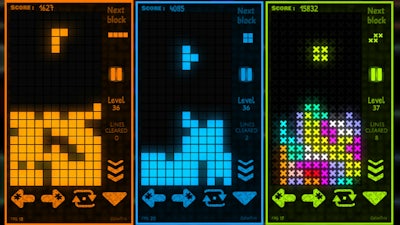
Pixel‑perfect nostalgia meets neon chaos. A classic Tetris‑style grid bursts with vivid Color blocks that scramble, stack, and explode as you race to clear lines. Every match feels like a high‑score sprint, and the 2D arena never stops demanding sharper Skill. If you love quick‑fire puzzles that keep your thumbs buzzing, this is the title that grabs attention and refuses to let go.

Full controller support means you can dominate with keyboard, mouse, touch, or any gamepad. The core loop is simple: shift pieces left or right, drop them fast, and spin them into place. Master the following inputs to own the leaderboard:

  • Go back / close menu / pause: Keyboard – [Esc / X / Numpad –]; Gamepad – [Cancel (East)]
  • Submit / confirm: Keyboard – [Enter / Space]; Gamepad – [Submit (South)]
  • Navigate menus: Keyboard – [WASD / Arrow keys]; Gamepad – [D‑pad / Any stick]
  • Move left: Keyboard – [A / Left arrow]; Gamepad – [D‑pad Left / Any stick Left]
  • Move right: Keyboard – [D / Right arrow]; Gamepad – [D‑pad Right / Any stick Right]
  • Move down (slow): Keyboard – [S / Down arrow]; Gamepad – [D‑pad Down / Any stick Down]
  • Slam down (hard drop): Keyboard – [Shift / K]; Gamepad – [West]
  • Rotate clockwise: Keyboard – [W / L / Up arrow]; Gamepad – [North / D‑pad Up / Right shoulder]
  • Rotate anti‑clockwise: Keyboard – [Ctrl / J]; Gamepad – [Left shoulder]
  • Toggle full‑screen: Keyboard – [F11]
ColorTris Gameplay

Winning at ColorTris isn’t just about reflexes; it’s about reading the board and planning three moves ahead. Prioritize clearing the same Color rows to trigger chain reactions—each combo spikes your score and shrinks the playfield, forcing you to adapt. Keep an eye on the upcoming piece preview; a well‑timed rotation can turn a looming overflow into a perfect line. As you climb the ranks, the speed ramps up, testing both Speed and precision. The deeper you go, the more the game rewards daring placements and tight timing, turning raw Skill into a high‑score habit.

CrazyGames’ ColorTris Challenge

Ready to prove your puzzle prowess? Jump straight into the action on ColorTris and see why players keep coming back for more. With CrazyGames’ seamless platform, you’ll experience instant loading, smooth controls, and a community leaderboard that fuels competition. Play now, smash those lines, and let the colors fly—your next high score is just a tap away.

Instructions:

Controls

Full controller support : Can be played with keyboard, mouse, touch, gamepad, etc.
Go back, close menu, pause game

  • Keyboard - [ Esc / X / Numpad - ]
  • Gamepad - [ Cancel (East) ]

Click or press menu buttons

  • Keyboard - [ Submit (Enter) / Space ]
  • Gamepad - [ Submit (South) ]

Navigate menu buttons

  • Keyboard - [ WASD / Arrow keys ]
  • Gamepad - [ D-pad / Any stick ]

Move left

  • Keyboard - [ A / Left arrow ]
  • Gamepad - [ D-pad Left / Any stick Left ]

Move right

  • Keyboard - [ D / Right arrow ]
  • Gamepad - [ D-pad Right / Any stick Right ]

Move down

  • Keyboard - [ S / Down arrow ]
  • Gamepad - [ D-pad Down / Any stick Down ]

Slam down

  • Keyboard - [ Shift / K ]
  • Gamepad - [ West ]

Rotate clockwise

  • Keyboard - [ W / L / Up arrow ]
  • Gamepad - [ North / D-pad Up / Right shoulder ]

Rotate anti-clockwise

  • Keyboard - [ Ctrl / J ]
  • Gamepad - [ Left shoulder ]

Full screen / window mode

  • Keyboard - [ F11 ]
Customise Consent Preferences Close

We use cookies to help you navigate efficiently and perform certain functions. You will find detailed information about all cookies under each consent category below.

The cookies that are categorised as "Necessary" are stored on your browser as they are essential for enabling the basic functionalities of the site.

Always Active

Necessary cookies are required to enable the basic features of this site, such as providing secure log-in or adjusting your consent preferences. These cookies do not store any personally identifiable data.

Functional cookies help perform certain functionalities like sharing the content of the website on social media platforms, collecting feedback, and other third-party features.

Analytical cookies are used to understand how visitors interact with the website. These cookies help provide information on metrics such as the number of visitors, bounce rate, traffic source, etc.

Advertisement cookies are used to provide visitors with customised advertisements based on the pages you visited previously and to analyse the effectiveness of the ad campaigns.

We also use third-party cookies that help us analyse how you use this website, store your preferences, and provide the content and advertisements that are relevant to you. These cookies will only be stored in your browser with your prior consent.

You can choose to enable or disable some or all of these cookies but disabling some of them may affect your browsing experience.