Witchwood Potion Shop: Brew, Sell, Expand
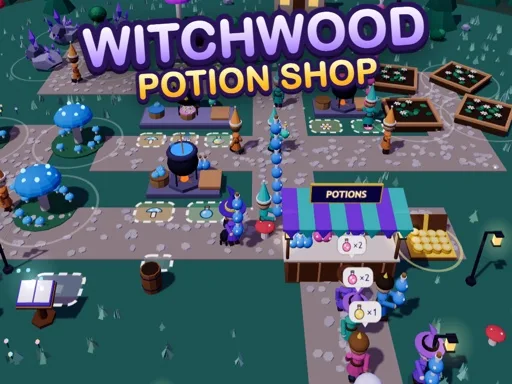
Aunt Hazel bequeaths her modest potion shop deep in the enchanted Witchwood, and you step into the role of a young witch ready to turn a sleepy clearing into a bustling Magic marketplace where shopping feels rewarding. The forest glows with bioluminescent mushrooms, moonflowers that open only at night, and star crystals that hum with raw energy. You gather each ingredient by hand, toss them into bubbling cauldrons, and carry the finished brews to a wooden stall where villagers, wandering travelers, and friendly ghosts line up for Mana, Love, and Star potions. Every sale drops coins into your purse, letting you unlock new cauldrons, expand the stall footprint, and hire a cute black cat named Pip who follows you everywhere. The experience blends casual simulation with light management depth, offering a no‑violence fantasy setting that feels both relaxing and rewarding. Bright 3D visuals highlight the forest canopy, while idle moments let apprentices gather resources while you focus on pricing and upgrade choices. CrazyGames hosts the title, giving you instant browser access without downloads.
Witchwood Potion Shop Mechanics
You control the witch with WASD or arrow keys, and you can also drag anywhere on the screen to walk across the clearing. The movement system feels responsive, letting you slip between cauldrons, ingredient piles, the sales stall, and coin stacks without friction. When you stand on an ingredient node you automatically pick it up, and stepping onto a cauldron starts the brewing timer. Walking over the stall deposits any finished potion into the display, while passing over coin piles adds the earnings to your purse. Upgrades appear as glowing platforms; standing on one triggers the purchase instantly, expanding basket capacity, speed, brew potency, or fire intensity.
- Use WASD, arrow keys, or drag anywhere to walk
- Walk over ingredients, cauldrons, the stall, and coins to interact
- Stand on an upgrade platform to purchase it
Witchwood Potion Shop Strategy
Hire the black cat Pip early; his presence boosts customer patience and adds a cute visual flourish that encourages longer visits. Recruit apprentices as soon as you can afford them because they gather mushrooms, moonflowers, and star crystals while you manage pricing and upgrade paths. Full moon nights double every sale, so stock the stall with high‑margin potions before the event triggers. Set up tasting tables near the entrance; happy patrons leave generous tips that accelerate coin flow. Activate the fairy ring to summon groups of travelers, creating surge periods that test your inventory speed. Invest spellbook upgrades in this order: larger basket, swift boots, stronger brews, hotter fires, each choice compounds the next. When the moon crystal lights, a new forest clearing unlocks, letting you replicate the business model in fresh terrain. The idle loop lets resources accumulate while you plan the next expansion, keeping the simulation engaging without pressure. CrazyGames delivers the experience in a browser window, so you can jump in for short sessions or long management marathons.
Start brewing now on CrazyGames and watch your shop thrive.
WASD arrow keys or drag anywhere on the screen to walk Walk over ingredients cauldrons the stall and coins to use them stand on an upgrade to buy it