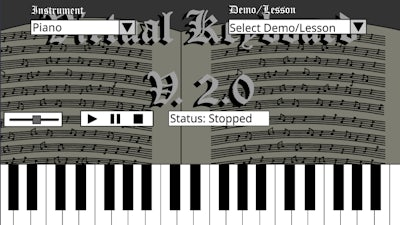
Virtual Keyboard V. 2.0


Feel the keys under your mouse. This browser‑based jam session drops you straight into a world where Piano meets Flash‑style fun. No tutorials, no load screens—just pure Music at your fingertips. Whether you’re a casual player or a seasoned composer, the game gives you instant control over notes, tones, and textures. CrazyGames delivers the hype in a sleek package that fits any screen.
Interaction is dead simple. Controls are limited to one action: Left-click to interact. That’s it—click a key, hear the sound, repeat. The interface mimics a real Piano layout, but you can swap the timbre for a string guitar, a snare drum, or even quirky synth patches. The sound engine reacts instantly, letting you layer riffs or practice a classic theme on the fly.
Staying hooked is easy when you blend practice with play. Start with the built‑in theme song—master the rhythm, then experiment by swapping instruments. The “Art” visualizer rewards sync by flashing colors that match your tempo, turning each session into a mini‑concert. As you nail more complex passages, the game unlocks extra sound packs, keeping the palette fresh. A quick tip: hit the lower octave keys first, then layer higher notes for a richer mix. The simple click‑only scheme means you can jam while scrolling through your feed.
Ready to turn clicks into chords? Jump straight into Virtual Keyboard V. 2.0 and feel the rhythm. CrazyGames hosts the title, so you’re just a tap away from endless practice, instant gratification, and a splash of visual Art. Hit the play button now and let the keys do the talking.

We use cookies to help you navigate efficiently and perform certain functions. You will find detailed information about all cookies under each consent category below.
The cookies that are categorised as "Necessary" are stored on your browser as they are essential for enabling the basic functionalities of the site.
Necessary cookies are required to enable the basic features of this site, such as providing secure log-in or adjusting your consent preferences. These cookies do not store any personally identifiable data.
Functional cookies help perform certain functionalities like sharing the content of the website on social media platforms, collecting feedback, and other third-party features.
Analytical cookies are used to understand how visitors interact with the website. These cookies help provide information on metrics such as the number of visitors, bounce rate, traffic source, etc.
Advertisement cookies are used to provide visitors with customised advertisements based on the pages you visited previously and to analyse the effectiveness of the ad campaigns.
We also use third-party cookies that help us analyse how you use this website, store your preferences, and provide the content and advertisements that are relevant to you. These cookies will only be stored in your browser with your prior consent.
You can choose to enable or disable some or all of these cookies but disabling some of them may affect your browsing experience.