Click to play
x
Controls

Controls

PC Controls

  • Drag right-click = move the canvas
  • Left-click = coloring / moving the canvas (depending on the selected tool)
  • Mouse-scroll = zoom in / out
  • B = paint tool
  • H = move tool

Mobile Controls

  • One finger = coloring / moving the canvas (depending on the selected tool)
  • Two fingers = zoom and move (it is recommended to do this with the "move" tool so as not to accidentally mess up)
Cross Stitch

Cross Stitch

Cross Stitch
Click to play
This game is not available on mobile.
rotate phone

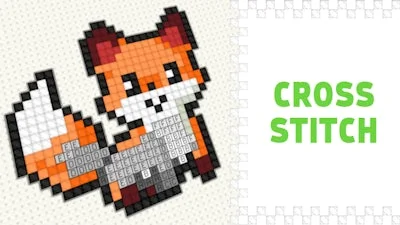
CrazyGames Presents: Cross Stitch - Embark on a Whimsical Coloring Adventure

Get hooked on the soothing world of Pixel Art, where every line and color tells a story. In Cross Stitch, you're not just coloring - you're creating a masterpiece that's uniquely yours. With 50 beautiful and intricately designed drawings to color, our game is the perfect blend of relaxation and challenge, guaranteed to captivate players of all ages.

Ready to get started? Mastering the art of Cross Stitch is easier than you think - with our intuitive controls, you'll be creating stunning works of art in no time. Here's a rundown of how to play:

  • PC Controls:
    • Drag right-click: Move the canvas
    • Left-click: Color or move the canvas (depending on the selected tool)
    • Mouse-scroll: Zoom in or out
    • B: Paint tool
    • H: Move tool
  • Mobile Controls:
    • One finger: Color or move the canvas (depending on the selected tool)
    • Two fingers: Zoom and move (it's recommended to use this with the 'move' tool so as not to accidentally mess up)
    Cross Stitch Gameplay

    To take your coloring game to the next level, we recommend experimenting with different color combinations and techniques. For example, try using layering to add depth to your designs or mixing bold colors to create stunning contrasts. With every new creation, you'll be one step closer to becoming a true Pixel Art master.

    Are you ready to unleash your creativity and experience the joy of Cross Stitch for yourself? Head over to CrazyGames to play now and discover a world of coloring and relaxation that's waiting just for you. With new drawings and challenges added regularly, you'll never run out of exciting content to explore in Cross Stitch. Happy coloring!


Instructions:

Controls

PC Controls

  • Drag right-click = move the canvas
  • Left-click = coloring / moving the canvas (depending on the selected tool)
  • Mouse-scroll = zoom in / out
  • B = paint tool
  • H = move tool

Mobile Controls

  • One finger = coloring / moving the canvas (depending on the selected tool)
  • Two fingers = zoom and move (it is recommended to do this with the "move" tool so as not to accidentally mess up)
Customise Consent Preferences Close

We use cookies to help you navigate efficiently and perform certain functions. You will find detailed information about all cookies under each consent category below.

The cookies that are categorised as "Necessary" are stored on your browser as they are essential for enabling the basic functionalities of the site.

Always Active

Necessary cookies are required to enable the basic features of this site, such as providing secure log-in or adjusting your consent preferences. These cookies do not store any personally identifiable data.

Functional cookies help perform certain functionalities like sharing the content of the website on social media platforms, collecting feedback, and other third-party features.

Analytical cookies are used to understand how visitors interact with the website. These cookies help provide information on metrics such as the number of visitors, bounce rate, traffic source, etc.

Advertisement cookies are used to provide visitors with customised advertisements based on the pages you visited previously and to analyse the effectiveness of the ad campaigns.

We also use third-party cookies that help us analyse how you use this website, store your preferences, and provide the content and advertisements that are relevant to you. These cookies will only be stored in your browser with your prior consent.

You can choose to enable or disable some or all of these cookies but disabling some of them may affect your browsing experience.